Real Estate Flyer Templates: Every Good Source (2026)
Real estate flyer templates from 9 sources, a free flyer maker, and why a listing flyer is judged by what its QR code opens: the home's own website.
By Yas Rajah
· 16 min read
Contents
- Where to get real estate flyer templates
- Canva: the default, and deservedly so
- Adobe Express: stronger typography, same idea
- Vistaprint: design and printing in one place
- PosterMyWall: enormous library, fast edits
- Zillow: a straightforward template built for agents
- WisePelican: print and mail, handled
- MyCreativeShop: a smaller library with printing
- Etsy: independent designers
- Word: already on your machine
- Our free flyer maker: a form instead of a canvas
- A listing flyer is a QR code with a photo, not a poster
- For Rent flyers
- Making a flyer with our free flyer maker
- The parts that matter more than the template
- Standard sizes
- Where Superlisting fits
- FAQ
- Sources
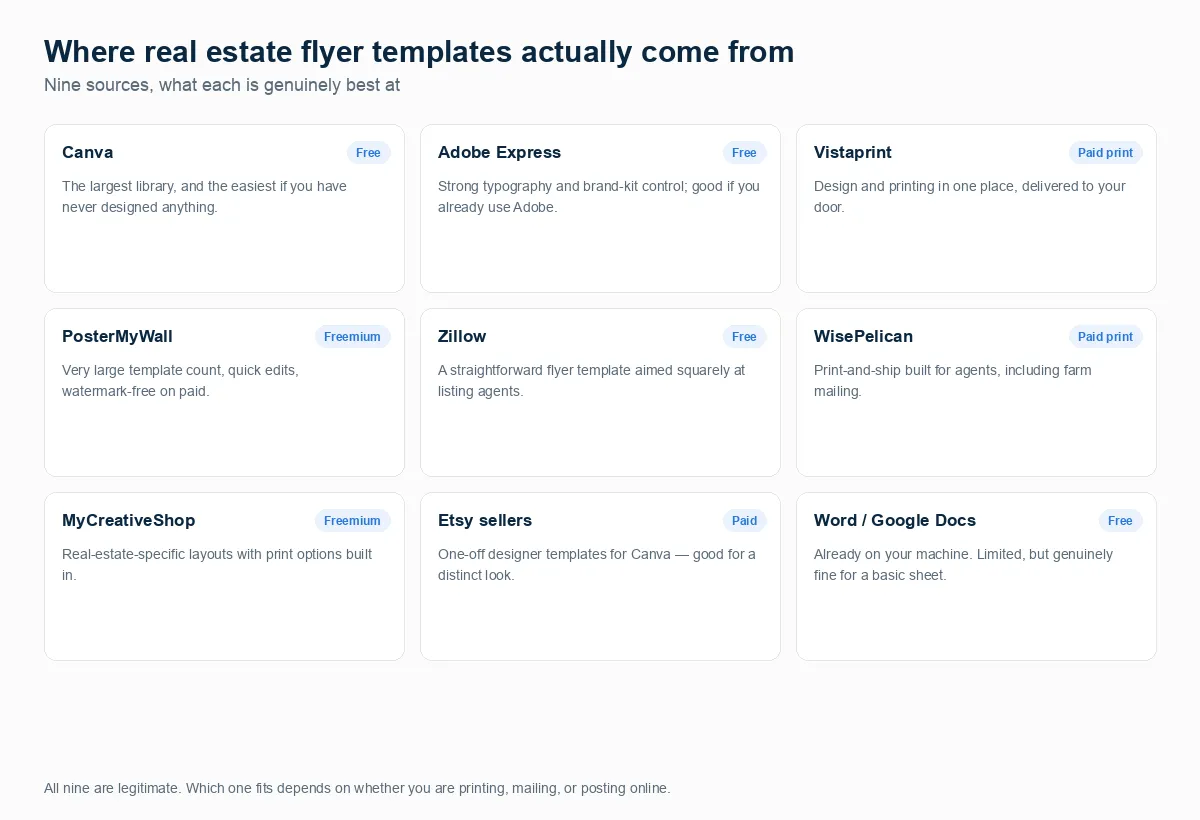
The best free source of real estate flyer templates is Canva, whose free plan includes 1.6 million+ templates; Adobe Express is the stronger choice on typography, Vistaprint and MyCreativeShop when you want it printed, and WisePelican when the flyer is really a mailer. If you’d rather fill in a form than design, our free real estate flyer maker makes a printable For Sale or For Rent flyer in the browser, with your photos and an optional QR code, and saves it as a PDF. The right source depends on what happens to the flyer next, not on which library is biggest: a template you’ll print at home is a different product from one you’ll mail to four hundred houses.
A listing flyer has a narrower job than it looks. 52% of buyers found the home they bought online, and nearly half said their search started there (NAR figures, cited on nar.realtor, March 2026), so the person holding your flyer already shops for homes online. A listing flyer is a QR code with a photo, not a poster: its job is to move someone standing at the home to the home’s own website, so judge every flyer by what its QR code opens.
There are hundreds of thousands of templates spread across nine or ten good sources, and the reason it still feels hard is that nobody tells you which source fits which job. This is the full list, what each one is good at, where a flyer’s QR code should point, and the parts of a flyer that matter more than the layout you pick.
What’s changed (24 October 2026): we added a section on what a listing flyer’s QR code should open, a short note on For Rent flyers, and a walkthrough of the free flyer maker we’ve just launched (Reallyo makes it, and publishes this blog).
Our 15 October re-check of all nine sources still stands: all are live, Canva’s free plan limits its brand kit to three colors (the full brand kit needs Pro, at US$144 a year), and Google Docs has no flyer template category at all; Word does. Interest in templates is falling: in our search data, US searches for “real estate flyer templates” dropped from about 260 a month in August 2025 to 90 in August 2026, and “real estate flyer” from 1,600 to 1,000.
Where to get real estate flyer templates
Canva: the default, and deservedly so
The largest free real estate template library anywhere, and the easiest starting point if you’ve never designed anything. Drag-and-drop editing, a deep photo and icon library, and a free plan that covers most agents. The catch is branding: on the free plan the brand kit holds three colors only. Canva Pro (US$144 a year for one person) gets you five brand kits and 3.6 million+ templates, and once your fonts, logo and headshot are saved, every later flyer takes a couple of minutes.
Adobe Express: stronger typography, same idea
Free templates with Adobe’s type and color handling behind them, which shows if you care about how the text sits. The free plan needs no credit card. It’s worth it if you already use anything else from Adobe, since brand assets carry across.
Vistaprint: design and printing in one place
Flyer templates with printing and delivery attached: 11 sizes, four paper stocks, and quantities from 25 to 20,000. The advantage isn’t the template library; it’s that you never touch bleed settings, paper weights or a print shop. Order, and it arrives.
PosterMyWall: enormous library, fast edits
4 million+ design templates across every category, including a real estate flyer section, with quick in-browser editing. The free plan lets you design and download; high-quality downloads cost from $5.99 each unless you’re on a paid plan, which makes them unlimited. Good when you want volume and variety to choose from.
Zillow: a straightforward template built for agents
Zillow publishes a real estate flyer template guide aimed squarely at listing agents, with free templates at the end. It’s a focused guide, written by people who look at listing marketing all day. (The page moved: Zillow’s old agent-resources address now redirects to its Premier Agent sign-up page.)
WisePelican: print and mail, handled
Built for agents doing farm-area marketing: they print and mail to a list you choose. Its pricing page says its 6 × 9 jumbo postcards cost $1.04 each in any quantity, “printing, mailing, and postage” included, so a thousand-home farm is about $1,040 a drop. If your flyer is going into four hundred mailboxes rather than onto a hall table, this is a different and more appropriate product than a template library.
MyCreativeShop: a smaller library with printing
30,000+ designer-made templates with a real estate section, free to start, with print-and-ship ordering built in. Worth a look if the big general-purpose libraries feel like too much choice.
Etsy: independent designers
Individual designers sell Canva-based flyer templates. The appeal is a look that isn’t the same one every other agent in your market is using. Quality varies by seller, so check the reviews and the preview closely.
Word: already on your machine
Microsoft publishes free flyer templates for Word. Nobody will call them beautiful, but for a one-page sheet with a photo, the details and your contact information, they work and they cost nothing. Google Docs is the exception: its template gallery has brochures but no flyers.
Our free flyer maker: a form instead of a canvas
The Reallyo flyer maker isn’t a template library. You type the price or rent and the details, add up to four photos, pick one of three templates and print. It’s free with no account, it makes For Sale and For Rent flyers, and your photos never leave your browser. How it works is below.
Which to use: printing at home, Canva or Adobe Express. Professionally printed, Vistaprint or MyCreativeShop. Mailing to a farm, WisePelican. A clean flyer for one listing in five minutes with no design work, our free maker. Whichever you pick, point its QR code at the home’s own website. The quiz above sorts this in about fifteen seconds.
Where should you get your real estate flyer?
Four questions, about fifteen seconds. Nine good sources and a free maker exist; this points you at the right one.
Question 1 of 4
What happens to the flyer once it exists?
Question 2 of 4
How much design confidence do you have?
Question 3 of 4
How often do you need one?
Question 4 of 4
What is your budget for this?
Your answer
Give the listing its own website first, then point every flyer at it
If the flyer mostly gets shared online or texted, the page behind it does the work. Superlisting builds a website for one property from a listing link, with a full-screen gallery, your listing video, a map and a contact form on every page. Your first one is free; unlimited property websites are $29 a month. Put its address in your flyer's QR code.
Build a property website free →Your answer
Use the free flyer maker, and point its QR code at the home's website
A listing flyer's job is to move someone standing at the home to the home's own website, so the QR code matters more than the layout. Our free flyer maker builds a printable For Sale or For Rent flyer in the browser with no account: one to four photos, three US Letter templates and an optional QR code to any link. Your photos are never uploaded. Scan the code before you print, and save the flyer as a PDF.
Make a flyer free →Your answer
Canva or Adobe Express, and set your brand kit up once
For occasional flyers you'll print yourself, the big free template libraries are hard to beat. Canva's free plan has 1.6 million+ templates, though its brand kit holds three colors only; Pro (US$144 a year) saves your fonts and logo so every later flyer takes minutes. Word's free flyer templates work too if you'd rather not learn another tool.
What belongs on the flyer →Your answer
Let a printer do the work, or a mail service for a farm
When the output is professionally printed, services that combine templates with printing save a round trip. Vistaprint (11 sizes, from 25 copies) and MyCreativeShop both do this, and you aren't managing bleed settings or paper weights yourself. If the flyer is really a mailer to a farm area, WisePelican prints and mails to your list and quotes $1.04 per 6 × 9 postcard with postage included, about $1,040 per thousand homes.
What belongs on the flyer →Get new posts on listing marketing
We'll email you when we publish new guides on flyers, open houses and listing marketing, and when the prices in this one change.
No spam, unsubscribe anytime.
A listing flyer is a QR code with a photo, not a poster
A listing flyer goes home in the pocket of someone who just walked through the house, or sits in the box on the yard sign for whoever stops at the curb. Either way, the reader doesn’t need more words on paper. They need a way to see the whole home again on their phone that evening, and to show it to whoever they’re buying with.
That changes how to judge one. The layout matters less than the answer to one question: what does the QR code open?
| The QR code opens | What the buyer gets | Our verdict |
|---|---|---|
| The home’s own property website | Every photo, the video, the map and a contact form that reaches you | Best |
| The open house sign-in page | A sign-in on their own phone at the door | Best for the open house itself |
| The listing on a portal | The full listing and the portal’s contact form, alongside other homes the portal suggests | Works; you hand the visit to the portal |
| Your website’s home page or your brokerage’s | A search they have to do themselves, on a phone | Weak |
| Nothing (no QR code) | A phone number for the few people ready to call now | Misses everyone who’d rather look first |
Two habits follow from this. Scan the code from the printed copy before you print a hundred, because a typo in the link is invisible on paper. And keep the destination alive: flyers stay on fridges and in sign boxes longer than you expect, so when the home sells, the page it opens should say so rather than return an error.
Where the QR code should point: a website for that one property. Superlisting builds one from a listing link: paste the link and it builds the property’s website with a full-screen gallery, your listing video, the neighborhood on a map and a contact form on every page, on its own address or your own domain. Your first one is free. Put its address in the flyer’s QR code.
For Rent flyers
The same rule holds for a rental, where the QR code opens the unit’s listing page. Add the available date, show the total monthly rent if any fee is mandatory, and describe the property, not the person: the Fair Housing Act makes it unlawful to publish any “notice, statement, or advertisement” for renting a dwelling that indicates a preference based on a protected characteristic (42 U.S.C. § 3604(c)). For a building with several units, one “Now Leasing” flyer with “From $” rent and a QR code to the list of available units beats a flyer per unit. Our apartment flyer guide covers the rest.
Making a flyer with our free flyer maker
Our free real estate flyer maker makes For Sale and For Rent flyers. Everything happens in your browser: there’s no account, no watermark and no limit on how many you make. These are the steps, checked against the tool’s own code on 24 October 2026.
- Choose For sale or For rent. The banner options change with it: For Sale, Just Listed, Open House or Coming Soon for a sale; For Rent, Now Leasing, Available Now or Coming Soon for a rental.
- Fill in the property. Address, a headline, the price, beds, baths, square feet and the open house or showing time (for a rental: the monthly rent and the available date). Then three to six highlights.
- Add one to four photos. The first is the main photo. They’re resized in your browser and drawn onto the flyer on your screen, and they’re never uploaded, so keep the PDF: when you close the page, they’re gone.
- Add your details and logo. Name, brokerage, phone and email are optional. The browser remembers them, with your logo, template and color, for your next flyer; it never keeps the property or the photos.
- Pick a template and a color. Three, all US Letter portrait: Classic (a color banner with the status and price, a big photo, the facts and a checklist of highlights), Big photo (the main photo edge to edge with the price on it) and Minimal (a serif headline, thin lines and white space). An optional “Equal Housing Opportunity” line sits in the footer; it starts ticked, and you can untick it.
- Add a QR code if you want one. Tick the box and paste any link. For a listing, that’s the home’s property website; for a rental, the unit’s listing page. For an open house, make a QR sign-in with our free open house sign-in sheet first and paste its sign-in link, so visitors sign in from the flyer on their own phones.
- Print or save as PDF. The flyer is one US Letter page with no margins, so the PDF prints the same at home or at a print shop.
Where it stops. Three templates, one size (US Letter: no half sheet, A4 or postcard), and no free-form design beyond the color and your logo. If you want to move things around, use Canva or Adobe Express. If you only need the code for a sign rider or a window card rather than a whole flyer, our real estate QR code generator makes the code and printable sign artwork.
The parts that matter more than the template
A template decides the layout. These decide whether the flyer does anything.
The address and price, large. The reader has seen several homes. If they can’t tell at a glance which one this is, the design has failed regardless of how it looks.
One photo, not six. At flyer size, six thumbnails are six things nobody can see. Use the strongest exterior or the best room. This is where we part company with the AI answers: when we asked ChatGPT and Gemini what a listing flyer should include (15 October 2026), both recommended a hero photo plus two to four smaller ones, and both suggested a “catchy” headline. We’d spend that space on the address, the price and the facts below.
Three checkable facts. Taxes, HOA, year built, square footage. These do the work adjectives pretend to do: a buyer can act on “$5,240 taxes, no HOA” and can’t act on “beautifully appointed”.
A face and a direct number. Not the office switchboard. The person they met is the reason they’ll call.
A QR code to the listing’s own page. The flyer’s real job is to move someone somewhere you can measure. A QR to the property’s own page keeps them on your listing rather than sending them to a portal that will show them four competing homes.
If any photo on the flyer is virtually staged, label it. Most MLSs require the disclosure, and California made it a matter of statute in 2026.
We go deeper on the layout itself in open house flyer examples. For a rental, what an apartment flyer needs adds the all-in rent line and the Fair Housing wording rules. The flyer is half of an open house; the other half is capturing who came, and our free open house sign-in sheet prints with a QR code so visitors can sign in on their own phones.
Standard sizes
- 8.5 × 11 inches (US Letter): the default for a listing flyer, what every template library defaults to, and the only size our free maker prints.
- 8.5 × 5.5 inches (half sheet): cheaper to print in volume, common for handouts and door-knocking.
- A4: the equivalent default outside the US.
- 4 × 6, 5 × 7 or 6 × 9 inches: postcard sizes, used for farm mailing rather than open house handouts.
Check your printer’s or mail service’s own specification before designing, because bleed and safe-margin requirements differ between them.
Where Superlisting fits
The flyer maker gives you the paper. The QR code still needs a page worth opening. Superlisting builds a website for one property from a listing link: a full-screen gallery, your listing video, the neighborhood on a map and a contact form on every page, so inquiries come to you. It’s built for phones first, sits on its own address or your own domain, and you can switch between 21 designs. Your first one is free, and unlimited property websites are $29 a month.
FAQ
What is a real estate flyer called?
Usually just a listing flyer or property flyer. You’ll also see “listing sheet”, “feature sheet” or “property brochure”; brochure normally implies a folded, multi-page piece rather than a single sheet.
What to include in a real estate flyer?
The address and price prominently, one strong photo, three verifiable facts such as taxes, HOA and year built, the agent’s photo and direct number, and a QR code to the listing page. For a rental, swap the taxes and HOA for the available date and what the rent includes. Keep the description short: the reader is usually standing at the property.
Is there a free real estate flyer maker?
Yes. Reallyo’s free real estate flyer maker makes For Sale and For Rent flyers in the browser with no account: three US Letter templates, one to four photos, your logo, an optional QR code to any link, and print or save as PDF. Your photos are never uploaded. Canva and Adobe Express are free too, as template editors rather than form-based makers.
What should the QR code on a real estate flyer link to?
The home’s own property website: every photo, the video, the map and a way to contact you, on one page built for a phone. At an open house, a second code for the sign-in sheet works well. A portal listing works too, but the visit then belongs to the portal. Scan the code from a printed copy before you hand the flyers out.
Do real estate flyers work?
As advertising they reach people who are already at the property, so they aren’t a discovery channel. As a takeaway that carries a QR code and a direct number into someone’s kitchen that evening, they work well. The failure mode is a flyer with nothing on it to act on.
Where can I create flyers for free?
Canva, Adobe Express, PosterMyWall’s free plan, Zillow’s template, Word’s flyer templates and Reallyo’s free flyer maker all cost nothing.
Can ChatGPT make flyers?
It can generate an image that looks like a flyer, but it’s unreliable for anything with exact text, prices and contact details: image models routinely garble small type and invent characters. Use it to draft the wording, then set that wording in a template or a flyer tool. The same limitation applies to listing photos, which we measured in can ChatGPT do virtual staging.
Does Google have a flyer template?
Not in Google Docs. Its template gallery has brochure templates but no flyer category, and a Google Docs community expert confirms “There aren’t any specific flyer templates in Docs at this time.” The usual workaround is to use the first page of a brochure template.
Is there a flyer template in Word?
Yes. Microsoft publishes free flyer templates for Word that open in Word for the web, and you can save the result as a PDF or a shareable link. The constraint is design range rather than capability.
What is the standard size of real estate flyers?
8.5 × 11 inches (US Letter) is the standard for listing flyers in the US, with 8.5 × 5.5 half sheets common for high-volume handouts and 4 × 6, 5 × 7 or 6 × 9 used for mailers. A4 is the default outside the US.
Where can you print flyers for free?
Printing is rarely free. The cheapest routes are your own printer for small runs, or office supply and online print services for volume, where per-unit cost falls sharply above a few hundred copies. Some brokerages cover printing for listing marketing, so ask before you pay for it yourself.
Free syndication & listing marketing
List Once. Syndicate and Market your listings. Everywhere.
Reallyo sends your rental to Zillow, Apartments.com and the rest of its 19-site rental network, then turns it into a listing page, a video, social posts and flyers. Free for one active listing, no card.
Sources
- Canva plans and template counts: canva.com/pricing, checked 15 October 2026.
- Adobe Express free plan: adobe.com/express/pricing. Vistaprint flyer options: vistaprint.com. PosterMyWall plans: postermywall.com/premium. WisePelican pricing: wisepelican.com/pricing. MyCreativeShop: mycreativeshop.com. Zillow’s template guide (dated 4 December 2024): zillow.com. Microsoft Word flyer templates: create.microsoft.com. All checked 15 October 2026.
- Google Docs flyer templates: Google Docs Editors Community.
- Buyers who found their home online (52%): NAR figures cited on nar.realtor, 25 March 2026, checked 24 October 2026.
- Superlisting features and price: superlisting.co homepage, checked 24 October 2026.
- Fair Housing Act advertising provision: 42 U.S.C. § 3604(c), Cornell LII.
- Reallyo free tools: real estate flyer maker (features checked against the tool’s code, 24 October 2026), real estate QR code generator, open house sign-in sheet.
- AI answers: ChatGPT and Gemini, two prompts each, US, 15 October 2026 (one run per prompt). Search demand: search data, US, August 2025 to August 2026.
- Virtual staging disclosure requirements by MLS and under California AB 723: our MLS-by-MLS breakdown.
- Image-model reliability on text and fine detail: our own test of five image models on the same room.