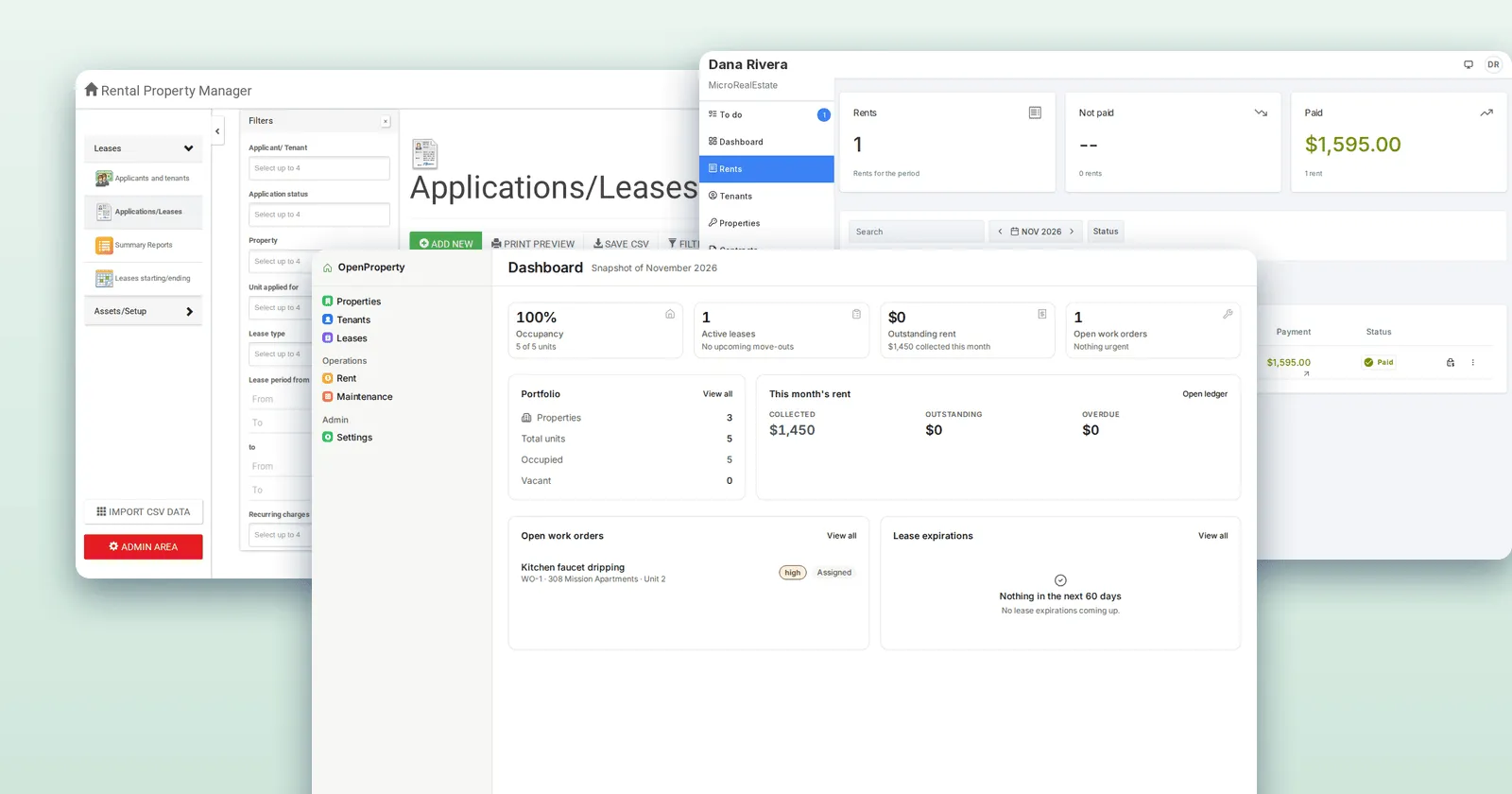
The Ultimate Guide to Building Your Own Property Management Software (PMS) (2027)
AI can now build your property management software. We had Claude build one in under 10 minutes, then mapped the plumbing it can’t build.
By Yas Rajah
· 36 min read
Contents
- The short answer: three ways to build it with AI
- What happened when we asked Claude to build one
- Who’s already doing this
- What property management software is made of
- Before you start: write the brief
- Step by step: from spreadsheets to your own software
- 1. Pick your tool
- 2. Build the core in small steps
- 3. Bring your data in
- 4. Photos and documents: let your AI build the upload flow
- 5. Logins, security and backups
- 6. Go live
- 7. Plug in the plumbing
- How to do it with each tool
- AI app builders: the easiest start
- Coding agents: more control, you host it
- Claude and ChatGPT: your planner, reviewer and (with Sites) host
- The plumbing AI can’t build
- Taking rent online
- Holding other people’s money: trust accounts
- Tenant screening
- E-signatures
- Texting tenants
- Email that arrives
- Address checks
- Fair housing in your listing text
- The data you’ll hold
- Getting your vacancies onto Zillow, Apartments.com and the rest
- What it costs: building vs buying
- Prompts to copy
- What we’d do
- The method
- FAQ
- Sources
Yes, you can build your own property management software with AI, and the software is now the easy part. We gave Claude a one-paragraph brief, the kind a manager with 40 units would write, and ran it as a coding agent on our own computer, the way Claude Code works. In under 10 minutes it built a working app (tenants and leases, a rent ledger that flags late payers, maintenance, a tenant portal, owner statements and a vacancy page), and all 25 of its tests passed.
What it couldn’t build was the plumbing. Getting vacancies onto Zillow, taking rent online, screening applicants, e-signing leases and texting tenants all need an outside company to approve you first. (Checked 30 October 2026. Disclosure: Reallyo publishes this guide and sells rental listing syndication, one of the plumbing pieces below.)
That’s the whole guide in one line: let AI build the software, and plug in the plumbing. It’s written for property managers and landlords who have never written code but can type into Replit, Lovable, ChatGPT or Claude. You’ll get the tools, what each costs, a step-by-step plan, prompts to copy, and the list of approvals no amount of code gets you past, with who grants each one and how long it takes.
Two numbers frame the decision. The cheapest AI app builders start at $16 to $25 a month with hosting included. Traditional software for a 40-unit portfolio runs from free to around $200 a month, and the bigger platforms add unit minimums and onboarding fees. Building is now cheap. Running the plumbing well is the part you pay for either way.
The short answer: three ways to build it with AI
| Kind of tool | Examples | Best for | Entry price (monthly) | Hosts your app? |
|---|---|---|---|---|
| AI app builders | Replit, Lovable, Bolt, Base44, Softr, Glide, Bubble, v0 | Anyone who wants a working app online without installing anything | $16 to $39 | Yes |
| Coding agents | OpenAI Codex, Claude Code, Cursor, Windsurf, GitHub Copilot, Google Jules | You, or someone helping you, who is fine with folders and a code editor | $10 to $20 | No: you host it |
| Chat apps | ChatGPT (with Sites), Claude | Planning the system, writing prompts, small tools; ChatGPT Sites can publish an app | $20 | ChatGPT Sites: yes. Claude: share links only |
Prices are each vendor’s own, checked 30 October 2026. Our pick for a non-technical manager is an AI app builder: it gives you the database, the logins and the hosting in one place, so you never touch a server. Use Claude or ChatGPT alongside it as your planner and reviewer.
Which way should you build it?
4 questions, 15 seconds. Find your route.
Question 1 of 4
Have you ever written code?
Question 2 of 4
How many units do you manage?
Question 3 of 4
Why build your own?
Question 4 of 4
How much time can you give it this month?
Your answer
Build it with an AI app builder
Start in Replit, Lovable, Bolt or Base44: $16 to $25 a month on their entry plans, with the database, logins and hosting included. Paste your brief, build the rent ledger, tenant portal and maintenance first, and test with fictional data. Then plug in the plumbing: a payment processor for rent, a screening company, and a syndication partner for the listing sites.
See how to send listings to the rental sitesYour answer
Build it with a coding agent and a developer
Claude Code or Codex ($20 a month with Claude Pro or ChatGPT Plus) gives you more control, but you host the app yourself, for example on Render from $7 a month plus $6 for a database. Have your developer review logins and anything that touches money before tenants use it, and plug in payments, screening and the listing sites rather than building them.
Plug in the listing sitesYour answer
Use ready-made software for now
With a small portfolio or only a few hours to spare, free and low-cost tools such as Innago, TurboTenant, Avail and RentRedi cover the basics, listing syndication included. Try an AI builder on one missing piece first, such as an owner report, before replacing everything.
Compare software for small landlordsWant help plugging in the listing sites?
Leave your email and we'll reply about sending your listings to the rental sites by XML feed, CSV or API.
No spam, unsubscribe anytime.
What happened when we asked Claude to build one
We gave Claude (Sonnet, working as a coding agent the way Claude Code does) this brief and nothing else:
“I run a small property management company with about 40 rental units across 12 buildings. Build me a simple web app to replace my spreadsheets: properties and units, tenants and leases, a rent ledger showing who has paid and who is late, maintenance requests that tenants can submit and I can assign to a vendor, a tenant portal where tenants log in to see their balance and submit requests, a monthly owner statement per property, and a page to market vacant units with photos that I can send to Zillow and other rental sites. Keep it simple and cheap to run.”
It worked alone, with no human corrections, on 30 October 2026. It started at 08:06 UTC and was done by 08:15: 1,369 lines of code, no outside software libraries, and 25 automated tests that all pass. We re-ran the tests ourselves; all 25 passed again.
| Part of the brief | Result | Notes |
|---|---|---|
| Properties and units | Built | 12 buildings and 38 units of fictional data |
| Tenants and leases | Built | Adding a tenant creates their lease and portal login |
| Rent ledger: who paid, who’s late | Built | Monthly charges, grace period, late fees, aging |
| Maintenance requests and vendors | Built | Tenants submit, you assign a vendor and record the cost |
| Tenant portal | Built | Balance, payment history, repair requests |
| Monthly owner statement | Built | Rent received, management fee, repairs, net to the owner |
| Vacancy page with photos | Built | Public listing pages, photo upload, an apply form |
| Sending vacancies to Zillow | Partly | A valid Zillow-format feed file; nothing can deliver it without Zillow’s approval |
| Taking rent online | Needs a provider | Built a manual way to record payments instead |
| Tenant screening | Partly | The application form only; reports need a screening company |
| E-signing leases | Needs a provider | Not built |
| Texting and emailing tenants | Partly | Messages are logged, never sent |
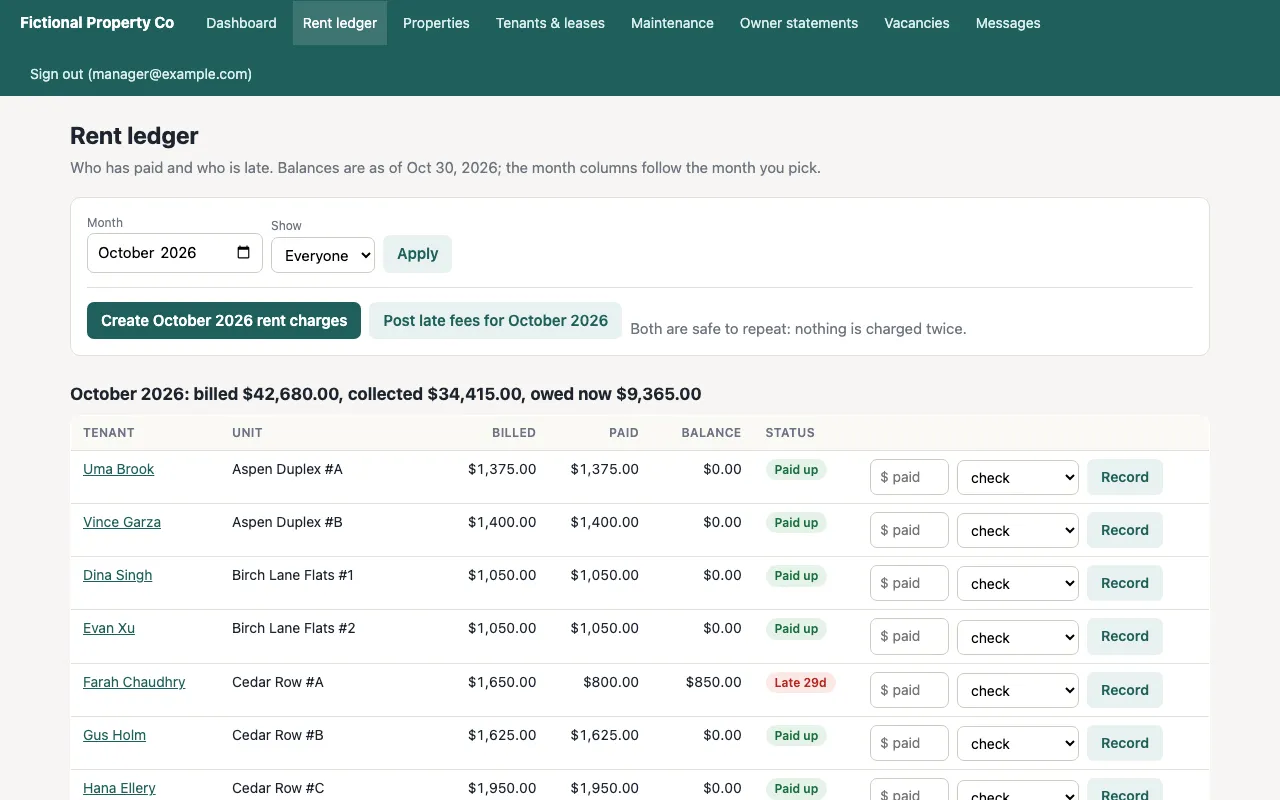
The rent ledger Claude built from the brief. Every name, unit and amount is fictional.
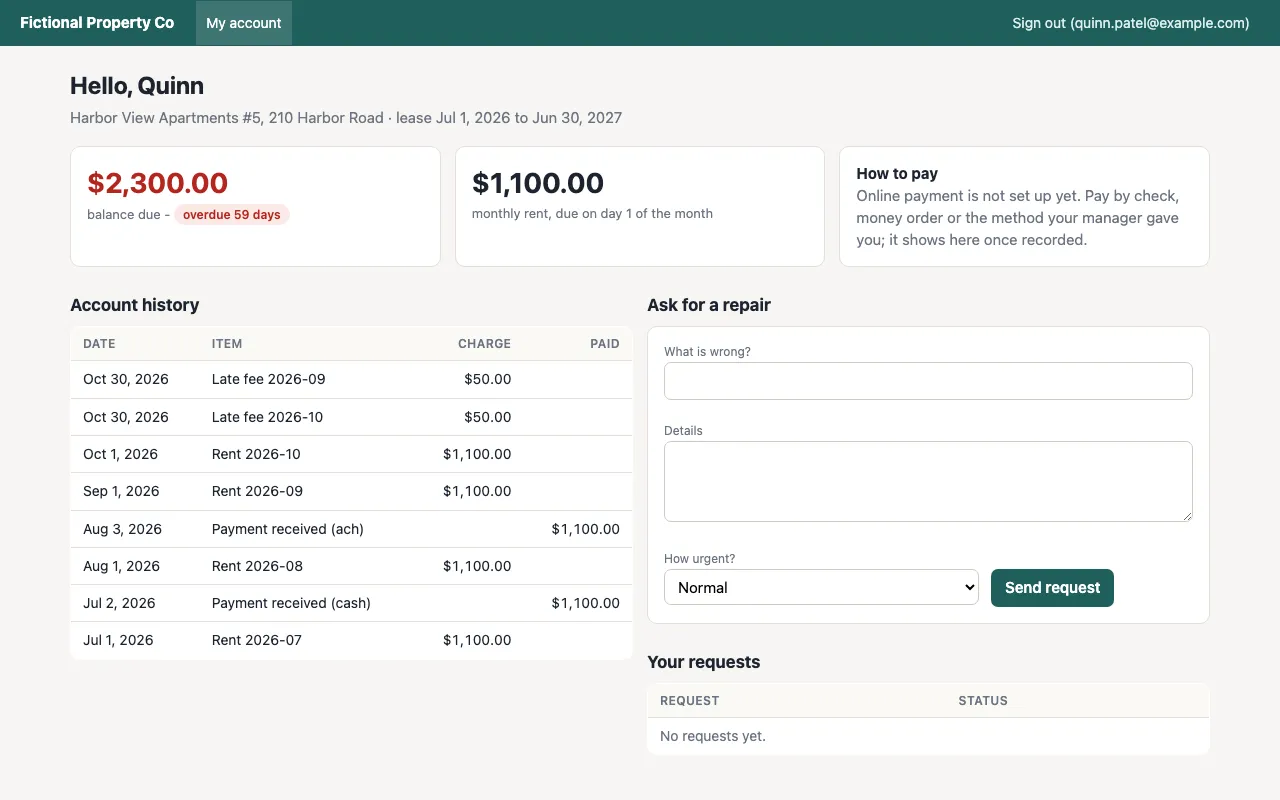
The tenant portal. Note the “How to pay” box: online payment isn’t set up, because that needs a payment processor’s approval.
The walls it hit were all approvals, not code. The Zillow feed file follows Zillow’s own published format and carries every field Zillow marks as required. But Zillow’s feed guide says “all new feeds must be approved by the Zillow Rentals business team”, served from a fixed public web address, tested with Zillow’s integrations team, and built from real listings: “placeholder or lorem ipsum content is not accepted”. Taking rent online needs a payment processor’s account and approval. Screening, e-signatures, texts and emails each need a provider. The same guide also points small portfolios to Zillow Rental Manager or a third-party syndication platform rather than their own feed.
It also made a mistake a person would catch. Its first fictional leases had already expired, so 22 of 38 units showed as vacant. It noticed from a screenshot, not from a test, and fixed it. That’s the habit to keep: look at what the AI built, with your own numbers, before you trust it.
The limits of the test: one run, one model, set up by us on a computer that already had the right software installed, running only on that computer (nothing was put online), and “done” was the AI’s own judgement. We didn’t run the brief in Replit, Lovable or ChatGPT, the browser tools most readers will use, so treat 10 minutes as what the AI can do, not how long your first build will take. Expect hours to days, mostly spent in back-and-forth about how you want things to work and checking the results with your own numbers. The method, the full results, the feed file and all eight screenshots are in our test folder notes.
Who’s already doing this
Property managers already use AI every day. In the IREM and AppFolio survey of 3,662 US property managers, “58% of real estate management professionals now use AI, up from 21% in 2023” (IREM, September 2026). Fewer trust what their software gives them: AppFolio’s 2026 benchmark of 1,617 managers found that 78% “cannot yet rely on the AI features in their legacy property management software” (AppFolio; AppFolio sells property management software).
Some are going further. A landlord with two homes, planning to leave their software for Claude, wrote in August 2026 that they’d “hook it up to specific services dedicated to tenant screening, rent collection, and document signing” (r/PptyMgmtSoftware, an anecdote). That’s this guide’s plan in one line. A reply in the same thread named what pulls people back to bought software: “compliance/audit trail stuff, state-specific lease clauses, security deposit handling, eviction notice timing” (reply). Both are right. Build the records and the screens, and plug in the parts that carry legal and financial rules.
What property management software is made of
Before you build, know the parts. Most property management software comes down to these, and AI can write the code for nearly all of them. The column that matters is the last one.
| Part | What it does | Can AI build it? | What else you need |
|---|---|---|---|
| Properties and units | Buildings, units, owners, rents | Yes | Nothing |
| Tenants and leases | Who lives where, dates, rent, deposits | Yes | A lease written by your attorney or your state association (don’t have AI draft it) |
| Rent ledger | Charges, payments, late fees, balances | Yes | Your state’s late-fee and grace-period rules |
| Online rent payments | Tenants pay by bank transfer or card | The screens, yes | A payment processor account and its approval |
| Owner statements | What came in, what went out, what the owner gets | Yes | Trust-account rules if you hold owners’ money |
| Maintenance | Requests, vendors, costs | Yes | Nothing |
| Tenant portal | Tenants log in, see balances, ask for repairs | Yes | Secure logins (your builder handles these) |
| Vacancy listings | A page per vacant unit with photos | Yes | Somewhere to store photos |
| Listing on Zillow and other sites | Your vacancies on the sites renters search | The feed file, yes | Approval from each site, or a syndication partner |
| Applications and screening | Applicant details, credit and background checks | The form, yes | A tenant screening company |
| E-signatures | Tenants sign the lease online | No | An e-signature provider |
| Texts and emails | Rent reminders, repair updates | The screens, yes | A texting provider with carrier registration, an email provider |
| Accounting | Ledgers, bank reconciliation, 1099s | Partly | Your accountant’s sign-off |
The widget below does this for your own list: tick what you want, and it splits your project into what your AI builds and what you plug in.
Before you start: write the brief
The brief is the most important thing you’ll write, and it’s the one part AI can’t do for you. Ours was one paragraph and got a working app. Yours should be a page.
- List what you actually do every week. Collect rent, chase late payers, log repairs, send owners their statements, list vacancies. Each one is a screen.
- Open your spreadsheets and copy the column headings. Those headings are your database. Paste them into the brief.
- Say who logs in. You, your staff, tenants, owners, vendors. Say what each one may see. Tenants see only their own lease and balance; owners see only their own buildings.
- Name the rules. Your grace period, your late fee, your management fee, when rent is due.
- Say what it must not do. No storing Social Security numbers. No sending texts until you’ve set up a provider. No deleting payments, only reversing them.
- Start with fictional data. Ask the AI to invent 10 tenants and 3 buildings, test everything, and only then bring in your real records.
Step by step: from spreadsheets to your own software
1. Pick your tool
If you’ve never written code, pick an AI app builder. Replit, Lovable, Bolt and Base44 run in your browser, build the database and the logins for you, and put the app online with one button. If you have a developer friend, a coding agent such as Claude Code or Codex gives you more control, but you’ll need to host the app yourself. Either way, keep Claude or ChatGPT open in another tab to plan with and to explain anything you don’t understand.
2. Build the core in small steps
Paste your brief and ask for the plan before any code: “Before you build anything, list the tables, the screens and who can see each one. Wait for my OK.” Then build one part at a time (properties and units, then tenants and leases, then the rent ledger), and test each with the fictional data before moving on. Ask for automated tests for anything involving money; that’s how our test app caught a ledger mistake.
3. Bring your data in
Export each spreadsheet as a CSV file. Ask your AI to build an import screen that shows you a preview, flags rows it can’t read, and only saves when you confirm. Then check the totals: the number of units, the rent roll and each tenant’s balance should match your spreadsheet to the cent.
4. Photos and documents: let your AI build the upload flow
Listing photos, lease PDFs and repair photos need to live somewhere other than your database. The app builders include storage. If yours doesn’t, or you want your own, the usual choices are object storage services such as Cloudflare R2 or Amazon S3. You don’t need to understand them: create the account, then tell your AI “build me a photo upload: resize to 2,048 pixels on the longest side, store the files in my R2 bucket, and give each photo its own public web address.” Rental sites fetch listing photos from a public address. Zillow’s feed guide says “you need to manage your own photo store and serve photos to Zillow via public URL”, wants photos at least 415 × 330 pixels, and asks you to change a photo’s address whenever you replace it.
| Storage | What you pay | Good to know |
|---|---|---|
| Cloudflare R2 | $0.015 per GB a month; first 10 GB free | No charge for downloads (“egress free”) |
| Amazon S3 | $0.023 per GB a month | First 100 GB a month of downloads free across AWS |
| Backblaze B2 | $6.95 per TB a month | Free downloads up to 3 times what you store |
| Bunny | $0.01 per GB for storage and for delivery | $1 monthly minimum |
| DigitalOcean Spaces | $5 a month for 250 GB and 1 TB of downloads | One flat price |
| Supabase Storage | 1 GB free; 100 GB on the $25 Pro plan | Comes with Supabase’s database and logins |
| Vercel Blob | $0.023 per GB a month; 1 GB included | Built in if you host on Vercel |
| Cloudinary | 25 free monthly credits; Plus $99 a month | Resizes and crops images for you |
Prices from each provider’s own page, 30 October 2026. For a small portfolio’s listing photos (a few gigabytes), R2’s free 10 GB or Bunny’s $1 minimum is plenty.
5. Logins, security and backups
Use the login system your builder provides; never ask the AI to invent its own password handling. Turn on two-step login for staff. Ask the AI to check that a tenant can never open another tenant’s page by changing a number in the address bar (it’s the most common mistake in home-built apps). Turn on daily backups and restore one once, so you know it works. And don’t store anything you don’t need: let your screening company keep Social Security numbers, and your payment processor keep bank details.
6. Go live
App builders publish with a button and a web address of their own; you can usually connect your own domain on a paid plan. Coding agents build the code but don’t host it, so you’ll need a hosting service. Ask the AI which one suits the code it wrote and to walk you through it step by step.
Typical starting prices: Render $7 a month for the app plus $6 for a database; DigitalOcean $5 for the app plus $15.15 for a managed database; Railway from a $5 monthly minimum; Supabase free or $25 for Pro (database, file storage and logins); Vercel free or $20 for Pro. Then move one building over first, run it alongside your old system for a month, and compare.
7. Plug in the plumbing
This is the rest of the guide’s job. For each piece, you’ll sign up with a provider, get approved, and then ask your AI to connect it. The plumbing section lists every piece.
How to do it with each tool
AI app builders: the easiest start
Replit: the strongest all-in-one choice for a custom system. Describe the app in plain English in your browser; Replit’s Agent builds it, adds a PostgreSQL database and logins, and publishes it with one click. Core is $20 a month ($18 billed yearly). The free plan publishes one app, which goes down after 30 days. It has a property management starting page. You can download the code or sync it to GitHub, so you’re not locked in.
Lovable: the smoothest describe-it-and-watch-it-appear experience. Its built-in backend gives you a database, file storage and logins. Pro is $25 a month for 100 credits and adds your own domain and code download; the free plan gives 5 build credits a day. There’s no property management template yet, so start from your brief.
Bolt: similar to Lovable, browser-based, with a database, sign-in and file storage in Bolt Cloud. Pro is $25 a month. Bolt says plainly that “all code that you create with Bolt … is your own code, which you can use for any legal purpose including commercial purposes.”
Base44: the most included on the free plan: a database, logins and hosting from day one. Starter is $16 a month billed yearly; Builder is $40. It has a rent-and-tenants starter app (PronarOS) in its launchpad. Its FAQ says you can export your code through GitHub, but the plan list shows GitHub only from Builder up, so check before you rely on it.
Softr and Glide: build portals on top of a table of data, closer to a smart spreadsheet than custom software. Both have ready-made property templates: Softr’s tenant portal and Glide’s Property Manager (“Manage properties, units, tenants, and maintenance all in one place”). Softr Basic is $19 a month and Glide Basic $25. Neither publishes a way to take your code with you.
Bubble: a visual editor with AI on top. More powerful, with more to learn. Starter is $32 a month billed yearly ($39 monthly). Bubble doesn’t export code: you can export your data, but leaving means rebuilding.
v0 by Vercel: excellent at good-looking screens, but a working system needs a database and logins added through integrations, which is more technical. Plus is $30 a month.
Google’s Firebase Studio is closing: it stopped new signups on 22 June 2026 and shuts on 22 March 2027, per Google. Don’t start a project there.
Coding agents: more control, you host it
Claude Code: included with Claude Pro, $20 a month ($17 billed yearly). It’s built into the Claude desktop app, so “there’s nothing else to install.” It writes the code on your computer or in a GitHub project. It doesn’t host anything, so pair it with a hosting service. This is how our test app was built.
OpenAI Codex: included with ChatGPT Plus, $20 a month, on the web, in the desktop app and in a code editor. Like Claude Code it writes code but doesn’t host it; what it builds can be published through ChatGPT Sites.
Cursor and Windsurf: code editors with AI built in, made for developers. Windsurf Pro is $20 a month. Cursor’s pricing page changed in October 2026, so check the current plans before you buy.
GitHub Copilot ($10 a month) and Google Jules (free for 15 tasks a day, more with Google AI Pro at $19.99): both work inside a GitHub project. Hand one a task and it comes back with the change ready to review. Good once your app exists; not where a non-coder should start.
You don’t have to start from a blank page, either. Several open-source property management apps are free to download, and a coding agent can adapt one to the way you work. We installed four of them and timed each, from about one minute to four: see the best open source property management software for how to get each one running.
Claude and ChatGPT: your planner, reviewer and (with Sites) host
ChatGPT: on Plus ($20 a month), ChatGPT Sites builds, previews and publishes “interactive websites and lightweight apps” at a chatgpt.site address, with a database of up to 10 GB per site and an option to add your own domain. OpenAI says “usage for running and hosting Sites, including traffic and storage, is separate”, and we couldn’t find the price, so check it before you put tenants on it.
Claude: Claude’s Artifacts build small tools you can share by link, on every plan including Free: a rent calculator, a move-in checklist, a vacancy tracker for your team. They aren’t a public, multi-user system with tenant logins. For that, use Claude Code (on Pro) or an app builder.
If you’d rather buy AI features than build them, our guide to AI for property management covers what the established platforms and AI-first tools offer.
Use both as your architect, whatever you build with. Paste your brief and ask: “What tables and screens does this need? What have I forgotten? What could go wrong with money or privacy?” Paste an error message and ask what it means. Paste a screen and ask what a tenant could do that I didn’t intend. It’s the cheapest second opinion you’ll get.
The plumbing AI can’t build
Every piece below has the same shape: your AI can build the screens in minutes, but the service behind them needs an account, an approval or a legal duty that only you can take on. Sign up first, then ask your AI to connect it. All prices and timings are from each provider’s or regulator’s own pages, 30 October 2026.
| Piece | Who you sign up with | What it takes | How long | What it costs |
|---|---|---|---|---|
| Listing on rental sites | Each site, or a syndication partner | Approval and feed testing per site | Zillow’s testing “typically takes 4-6 weeks” | Zillow’s feed program is free; partners vary |
| Online rent | A payment processor such as Stripe | Business verification | Not published | Bank transfer 0.8%, capped at $5; cards 2.9% + 30¢ |
| Paying owners | Stripe Connect or similar | Each owner verifies their identity | Not published | $2 per active account a month + 0.25% + 25¢ per payout |
| Holding rent and deposits | Your bank, under your state’s rules | A broker licence and a trust account, reconciled | Ongoing | Bank fees |
| Tenant screening | A credit bureau or screening company | A permissible purpose, housing-only use, adverse action notices | Equifax’s developer portal: “Typically, approval takes less than 48 hours”; others not published | Bureau API prices not published |
| E-signatures | An e-signature provider | An account and an API key | Same day | $30 to $75 a month to start |
| Texting tenants | A texting provider such as Twilio | Carrier registration of your business and message type | Manual brand reviews “seven business days or more”; campaigns “up to 5 business days” | $4.50 to $46 once, $15 vetting, $1.50 to $10 a month |
| Email that arrives | An email provider | SPF, DKIM and DMARC on your domain | Same day | Postmark free for 100 a month, then $15; Amazon SES $0.10 per 1,000 |
| Address checks | USPS | A USPS business account | Same day | No fee stated |
| Photos | Object storage | An account and a card | Same day | See the storage table above |
Taking rent online
Your app can show a “Pay rent” button in minutes. The money moving behind it needs a payment processor that has checked your business. Stripe charges “2.9% + 30¢ per successful transaction for domestic cards” and, for bank transfers (ACH), “0.8% per transaction … $5.00 cap”. Property management isn’t on Stripe’s restricted businesses list, but Stripe doesn’t publish how long its verification takes. If you pay owners out of the same system, Stripe Connect adds “$2 per monthly active account” plus 0.25% + 25¢ per payout, and each owner verifies their identity with Stripe. Bank-linking services such as Plaid and Dwolla don’t publish prices.
Holding other people’s money: trust accounts
If you manage for owners, the rent and deposits you hold usually aren’t yours, and state law says where they go. Texas defines “trust money” as “client’s money, earnest money, rent, unearned fees, security deposits, or any money held on behalf of another person” (22 TAC §535.146). California requires deposits into a trust account “not later than three business days following receipt” (10 CCR §2832). Florida requires a broker to place entrusted money in escrow “immediately … upon receipt” (§475.25), and “once monthly” a written comparison of what the broker owes with the reconciled trust balances (61J2-14.012). Illinois counts security deposits as escrow money (68 Ill. Adm. Code 1450.750). Your AI can build the ledger and the monthly reconciliation screen. The licence, the account and the duty stay with you, so have your accountant check the reports before you rely on them.
Tenant screening
Your app can take the application. The credit, criminal and eviction reports come from consumer reporting agencies, under the Fair Credit Reporting Act. You need a “permissible purpose” for every report (15 U.S.C. §1681b), and if a report plays any part in turning someone down you must send an adverse action notice (§1681m). The FTC says that notice “is required even if information in the consumer report wasn’t the primary reason for the decision” (FTC). For software, TransUnion, Experian and Equifax each have a route for technology providers, and none publishes an API price. The simplest path is a screening service the applicant pays for, with a link from your application form.
E-signatures
Electronic signatures are legal: the federal ESIGN Act says a contract “may not be denied legal effect, validity, or enforceability solely because it is in electronic form” (15 U.S.C. §7001). The signing itself, with its audit trail, comes from a provider: BoldSign’s API “Starts at $30/mo, includes 40 envelopes”, DocuSign’s developer Starter is $50 a month for 40 envelopes, and Dropbox Sign Essentials is $75 a month. Each has a free test mode, so your AI can wire it up before you pay. The lease itself should come from your attorney, not your AI.
Texting tenants
US carriers require businesses texting from ordinary 10-digit numbers to register first, under a scheme called A2P 10DLC, which Twilio describes as the standard “to ensure that SMS traffic to US end users … is verified and consensual”. You register your business (the brand) and what you’ll send (the campaign). Twilio says manual brand reviews “take seven business days or more” and “campaign reviews take up to 5 business days for standard use cases” (Twilio). Fees: $4.50 or $46 once for the brand, $15 to vet the campaign, then $1.50 to $10 a month, plus per-message charges. Tenants must opt in, and every text needs a way to opt out.
Email that arrives
Gmail and Yahoo filter mail from domains that can’t prove who they are. Google requires “SPF, DKIM, and DMARC” from bulk senders and asks you to keep spam reports “below 0.10%” (Google); Yahoo asks for the same records and one-click unsubscribe on marketing mail. Your AI can write the reminder emails; a sending service delivers them: Postmark is free for 100 emails a month and $15 for 10,000, and Amazon SES is $0.10 per 1,000. Ask your AI to show you which DNS records to add for your domain.
Address checks
Rental sites reject listings with addresses they can’t match. The USPS Addresses API checks an address against the Postal Service’s own records; you need a USPS business account, and its developer pages don’t state a fee. Ask your AI to check every new unit’s address when you save it.
Fair housing in your listing text
If your AI writes listing descriptions, read them before they go out. HUD’s rule makes it unlawful to publish an advertisement that “indicates any preference, limitation or discrimination because of race, color, religion, sex, handicap, familial status, or national origin” (24 CFR §100.75), including through “words, phrases, photographs, illustrations, symbols or forms”. Describe the unit, never the renter you’d like.
The data you’ll hold
Every state has a breach law: “All 50 states, the District of Columbia, Guam, Puerto Rico and the Virgin Islands have laws requiring private businesses … to notify individuals” of security breaches (NCSL). Keep as little as you can. The screening company can hold Social Security numbers and the payment processor bank details, so your own system never has to.
Getting your vacancies onto Zillow, Apartments.com and the rest
The listing sites are where AI hits its hardest wall, because each site decides who may send it listings. We read each one’s own partner pages:
| Site | How software gets listings on | What it takes | Cost to send |
|---|---|---|---|
| Zillow (also Trulia and HotPads) | Zillow’s feed program, for property management companies and software | An intake request, approval from Zillow’s Rentals Integrations team, then feed testing that “typically takes 4-6 weeks” with your real listings | ”There is no cost to participate in the program.” |
| Apartments.com | ”A feed is a third party vendor who will syndicate the listing into Apartments.com” | Vendor criteria aren’t published | Basic listings are free for 1 to 4 units |
| Zumper and PadMapper | An XML feed under a signed content agreement, or a syndication provider | Custom feeds limited to “feeds with 50+ properties”; “we do not offer API integration” | Free up to a limit |
| Apartment List | Partner contact or property management software | ”Currently, we are only working with properties with 20 or more total units” | Paid once a renter moves in |
| Realtor.com | No public feed application; small landlords list through Avail | Through partners and listing tools | Free through Avail |
When a vacancy gets no enquiries, the listing sites are the first place to look. As one reply on r/RealEstateTechnology put it, zero enquiries in a week is often “a syndication problem, not a demand problem” (thread, an anecdote).
Zillow’s approval and testing are sensible quality control: renters see listings that are real and current. They’re also why a listing feed is the one part of your system you shouldn’t build alone. Writing the feed file takes an AI two minutes. Getting each site to accept it is a relationship you’d have to build and keep, site by site. Zillow says as much: its feed guide asks “Should You Build Your Own Feed?” and suggests owners and managers with a small number of properties use Zillow Rental Manager or “a third-party syndication platform, rather than building and maintaining your own feed.”
How to plug in. A syndication partner already sends feeds to these sites, so your software sends one feed to the partner instead (here’s how rental listing syndication works, and what Zillow’s own syndication options are). With Reallyo (our product), you choose how: an XML feed (the format you’d send Zillow, or MITS, the industry’s standard rental feed), a CSV file, or the Listings API. Each listing keeps its own landlord’s or agent’s contact details, renters’ enquiries come back to you, and there’s no extra dashboard to log in to. Ask your AI: “Add an export of my vacant units as a CSV with these columns…” or “Send each vacant unit to the Reallyo Listings API when I tick ‘list it’.”
What it costs: building vs buying
Buying. What the established platforms charge, from their own pricing pages on 30 October 2026 (our guide to software for small landlords compares them in more depth):
| Software | Starting price | Minimum or catch | Listing on Zillow and Apartments.com |
|---|---|---|---|
| AppFolio | $1.49 per unit a month | 50-unit minimum and a minimum spend | Basic listings included |
| Buildium | $65 a month (Essential, up to 40 units) | Onboarding fee on Growth ($202) and Premium ($420) | Included on every plan |
| DoorLoop | $2.50 per unit a month, billed yearly | $199 a month minimum | Apartments.com free; Zillow is a paid service |
| Rentvine | ”As low as $1.50 per unit” (its FAQ says $2.50) | 30-unit minimum plus a platform fee | Zillow needs a signed Zillow feed agreement |
| Yardi Breeze | $1 per unit a month | $100 a month minimum | Included |
| TenantCloud | $15 a month billed yearly ($25 monthly) | Zillow is a $30, 30-day add-on per listing | Apartments.com free up to 4 units |
| RentRedi | $12 a month billed yearly ($29 monthly) | Unlimited units | Zillow fees vary by plan |
| Avail | Free; Plus $9 per unit | Tenants pay $2.50 per bank transfer on the free plan | Its own partner list |
| TurboTenant | Free; paid from $12.42 a month | None stated | Apartments.com yes; Zillow not on its list |
| Innago | Free | Earns on payments and screening | ”Completely free” listing syndication |
| Rent Manager | Quote only | Not published | Through its listing-site integrations |
Building. An app builder at $16 to $40 a month, plus the plumbing you’d pay for anyway: payment processing fees, screening fees, e-signature and texting providers, and a syndication partner for the listing sites. For 40 units, a build can run well under a traditional system’s bill, and it does exactly what you do, no more and no less.
The catch is your time and your responsibility. When you buy, the vendor fixes bugs, keeps the security patched and answers the phone. When you build, that’s you, with the AI’s help. That’s why the rule in this guide is to build the parts that make your business different and to plug in the parts that need approvals, money handling or legal compliance.
Prompts to copy
1. The plan. “Here is my brief: [paste]. Before writing any code, list the database tables, the screens, and who can see each screen. Ask me about anything unclear. Wait for my OK.”
2. One part at a time. “Build only the properties and units screens now, with 3 fictional buildings and 10 units. Add automated tests. Show me how to try it.”
3. The money check. “Write tests for the rent ledger: a partial payment, a late fee after the grace period, a reversed payment, and a tenant who pays two months at once. Show me each result.”
4. The privacy check. “Log in as a tenant. Try to open another tenant’s balance, lease or repair request by changing the web address. Fix anything that works.”
5. The import. “Build an import for this CSV [paste the first 5 rows]. Show a preview, flag rows you can’t read, and save nothing until I confirm. Then show me the total rent roll so I can compare it with my spreadsheet.”
6. The photo upload. “Build a photo upload for each vacant unit: resize to 2,048 pixels on the longest side, store the files in my [R2 / S3] bucket, and give each one its own public web address. Keep the order I drag them into.”
7. The listing export. “When I tick ‘list it’ on a vacant unit, include it in a CSV export [or: send it to the Reallyo Listings API] with the unit’s address, rent, beds, baths, photos, availability date and the landlord’s name, phone and email. When I untick it or mark the unit rented, remove it.”
What we’d do
Build it, but not all of it. If your current software makes you work around it, or charges you for 50 units when you have 30, an AI app builder will give you a system that fits in a weekend. Start with the rent ledger, the tenant portal and maintenance, because that’s where your days go. Keep Claude or ChatGPT open as your reviewer, and test anything that touches money with your own numbers.
Then plug in, don’t build, the plumbing. Let a payment processor move the money, a screening company run the checks, an e-signature provider handle signatures, a texting provider handle carrier rules, and a syndication partner get your vacancies onto the listing sites. Each of those runs on approvals and relationships your AI can’t create, and each has done the compliance work you don’t want to own.
The method
We ran the build test on 30 October 2026 with Claude Sonnet, working unattended as a coding agent, from the brief quoted above. It chose its own tools (Node.js with the built-in SQLite database, no outside libraries), wrote 1,369 lines of JavaScript and 25 tests, and saved eight screenshots. All data was fictional. Nothing was deployed, no accounts were created, and no messages were sent. We re-ran the 25 tests afterwards and checked the feed file with an independent XML validator. The Zillow requirements quoted come from Zillow’s own rentals feed guide and its feed integrations page. Tool and software prices come from each vendor’s own pricing page on 30 October 2026.
FAQ
Can I build my own property management software with ChatGPT or Claude? Yes. In our test, Claude, running as a coding agent on our computer, built a working system (properties, tenants, leases, a rent ledger, maintenance, a tenant portal, owner statements and a vacancy page) from a one-paragraph brief in under 10 minutes. ChatGPT Plus can publish small apps through ChatGPT Sites. What neither can do is the plumbing that needs approval: listing on Zillow, taking rent online, screening, e-signatures and texting.
How long does it take to build property management software with AI? The AI’s first working version can take minutes: our test, run as a coding agent on our own computer, took under 10. In a browser app builder, with your own back-and-forth, plan on hours for a first version. A version you’d run your business on takes days to weeks, mostly spent testing with your own data, deciding how each screen should work, and connecting payment, screening and listing providers, some of which take weeks to approve.
How much does it cost to build your own property management software? An AI app builder costs $16 to $40 a month on its entry plans, with hosting included. On top of that you pay the providers you’d pay anyway: payment processing, screening, e-signatures, texting and listing syndication. Traditional software ranges from free to about $1 to $5 per unit a month, often with minimums.
Can software I build myself post listings to Zillow? Only with Zillow’s approval. Zillow’s feed program is free, but it needs an intake request, approval from its Rentals Integrations team and feed testing that “typically takes 4-6 weeks” with real listings. Zillow suggests small portfolios use Zillow Rental Manager or a third-party syndication platform instead. A syndication partner such as Reallyo takes your listings by XML feed, CSV or API and sends them on.
Do I need a developer? Not to start. AI app builders such as Replit, Lovable, Bolt and Base44 run in your browser and handle the database, logins and hosting. A developer helps with a security review before tenants log in, and with connecting payment and screening providers.
Is it safe to keep tenant data in software I built with AI? It can be, if you use your builder’s own login system, test that tenants can’t see each other’s records, turn on backups and two-step login, and avoid storing what you don’t need, such as Social Security numbers or bank details. Let your screening company and payment processor hold those.
Can AI write my lease? Don’t use it for that. Use a lease from your attorney or your state’s apartment or REALTOR association, and have your software store and send it for signature through an e-signature provider.
What is the best AI tool for building property management software? For a non-technical owner, an AI app builder: Replit for the most complete all-in-one, Lovable or Bolt for the smoothest start, Base44 for the most on the free plan. Use Claude or ChatGPT alongside it to plan and review. Developers will prefer a coding agent such as Claude Code or Codex.
What is MITS? MITS (Multifamily Information Transaction Standards) is the rental industry’s standard format for listing and property data. It’s maintained by RETTC, which says “MITS is freely available for download and its use is completely voluntary”. Zillow’s feed program says “we will also accept MITS format”, so it’s a good format to ask your AI to export.
Free syndication & listing marketing
List Once. Syndicate and Market your listings. Everywhere.
Reallyo sends your rental to Zillow, Apartments.com and the rest of its partner rental network, then turns it into a listing page, a video, social posts and flyers. Free for one active listing, no card.
Sources
Our test: the brief, the app’s results, its feed file and screenshots are kept with this article (one run, 30 October 2026).
Listing sites (checked 30 October 2026):
- Zillow Group, Rentals feed integrations and Rental Listing Bulk Feed Guide
- Apartments.com, What is a feed?
- Zumper, Feeds
- Apartment List, List with us
- Realtor.com, Create a rental listing from Avail
- RETTC, MITS data models
AI tools (pricing pages, 30 October 2026): Replit, Lovable, Bolt, Base44, Softr, Glide, Bubble, v0, Firebase Studio notice, OpenAI Codex, Claude, Cursor, Windsurf, GitHub Copilot, Google Jules, ChatGPT and ChatGPT Sites.
Property management software (pricing pages, 30 October 2026): AppFolio, Buildium, DoorLoop, Rentvine, Yardi Breeze, TenantCloud, RentRedi, Avail, TurboTenant, Innago, Rent Manager.
Payments, signatures, texts, email and hosting (providers’ own pages, 30 October 2026): Stripe, Stripe Connect, Stripe restricted businesses, BoldSign, DocuSign developer plans, Dropbox Sign API, Twilio A2P 10DLC and fees, Google sender guidelines, Yahoo sender best practices, Postmark, Amazon SES, USPS Addresses API, Cloudflare R2, Amazon S3, Backblaze B2, Bunny, DigitalOcean Spaces, Supabase, Vercel, Cloudinary, Render, Railway, DigitalOcean App Platform.
Laws and regulators: 15 U.S.C. §1681b and §1681m (FCRA); FTC, Using consumer reports: what landlords need to know; 15 U.S.C. §7001 (ESIGN Act); 24 CFR §100.75 (HUD, discriminatory advertisements); 22 TAC §535.146 (Texas); 10 CCR §2832 (California); Fla. Stat. §475.25 and FAC 61J2-14.012 (Florida); 68 Ill. Adm. Code 1450.750 (Illinois); NCSL, security breach notification laws.